
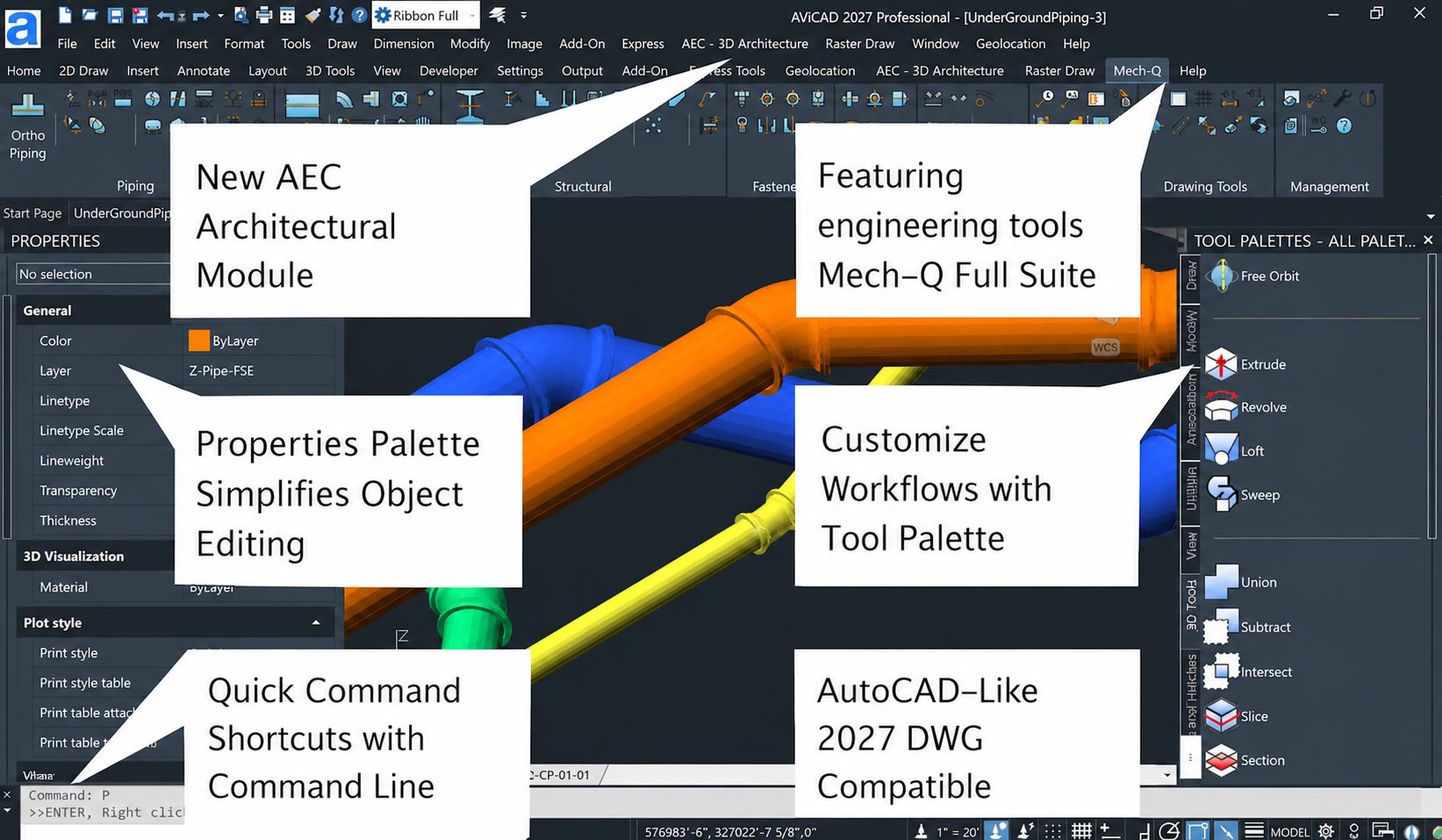
Screenshot of the AViCAD with some of the main features
AViCAD Main Features
Native DWG Compatibility
Open, edit, and save AutoCAD® DWG and DXF files with confidence. AViCAD works with current and earlier DWG formats while maintaining familiar AutoCAD-style commands and workflows.
Familiar and Easy to Learn
Choose between a modern Ribbon interface and a traditional CAD workspace. AViCAD includes familiar commands, aliases, tool palettes, dynamic blocks, annotative objects, and many of the tools CAD users already know.
Powerful 2D and 3D Design Tools
Create professional 2D drawings and 3D models using a complete set of drafting, editing, and visualization tools.
Features include:
- Dynamic Blocks and Advanced Blocks
- ViewCube navigation
- 3D solid editing
- Annotative scaling
- Data Linking with Excel
- Advanced table editing
- 20,000+ block library
- Architecture and Engineering Tools Included
- New Flex Licensing (share a license)
Unlike many CAD programs, AViCAD includes the Mech-Q engineering suite and AEC architectural tools at no additional cost.
Built-In AEC Tool Create:
- Walls and curtain walls
- Doors and windows
- Stairs and railings
- Architectural floor plans
- Structural, piping, ducting, and mechanical drawings
- File Exchange and Industry Compatibility
Work with a wide variety of file formats and design workflows.
- Autodesk® Revit® compatibility
- PDF to DWG conversion (Plus Version)
- STEP, IGES, and SolidWorks support (Plus Version)
- GIS and MAPIMPORT tools
- Export to DXF, DWF, STL, SVG, 3DS, and more
- Built for Productivity
AViCAD is designed to help users get productive quickly.
- Fast installation
- Built-in cloud backup support
- Improved XREF performance
- Network licensing available
- Windows 7, 10 and Windows 11 support
Familiar AutoCAD®-Style Workflows
Switching CAD platforms doesn’t have to mean starting over. AViCAD provides a familiar AutoCAD®-style environment with compatible commands, tool palettes, dynamic blocks, layouts, XREFs, and DWG file support.
Whether you’re creating new drawings or working with existing projects, you’ll feel comfortable using AViCAD from the very first day.
AViCAD 2027 has been released
AViCAD 2027 delivers major performance enhancements, new drafting tools, improved LISP compatibility, GIS enhancements, and hundreds of workflow refinements.
Highlights include:
- Built on the new IntelliCAD 14.1 engine
- Up to 63% faster object snapping
- New COMPARE command for reviewing DWG revisions
- Floating Drawing Windows for multi-monitor workflows
- New Migration Tool for transferring settings and customizations
- Expanded Visual LISP support, including VLX and FAS compatibility
- ArcGIS map support within GEOMAP
- Improved PDF2CAD workflow
- Revit 2026 compatibility
- Hundreds of drafting and productivity improvements
Mech-Q Engineering Suite Included
Unlike many CAD programs that require separate engineering add-ons, AViCAD includes the complete Mech-Q Engineering Suite at no additional cost.
Mech-Q integrates directly into AViCAD and provides four specialized modules for:
- Piping Design
- Structural Steel Design
- HVAC Ducting
- Mechanical Design
Features include intelligent parametric components, BOM generation, automatic layer management, P&ID symbols, steel detailing, stairs and railings, ducting layouts, mechanical hardware libraries, and both 2D and 3D design tools.
Whether you work in fabrication, construction, engineering, manufacturing, or plant design, Mech-Q helps automate repetitive drafting tasks and produce drawings faster.
Learn more about the Mech-Q Engineering Suite →